
For independent child-care centers and preschools

Everything Your Daycare Needs. One Beautifully Simple Platform.

Manage attendance, classrooms, staff, parent communication, enrollment, and tuition from one easy-to-use platform.
$89 a month for one center · 30 days free · no card to start · see both plans

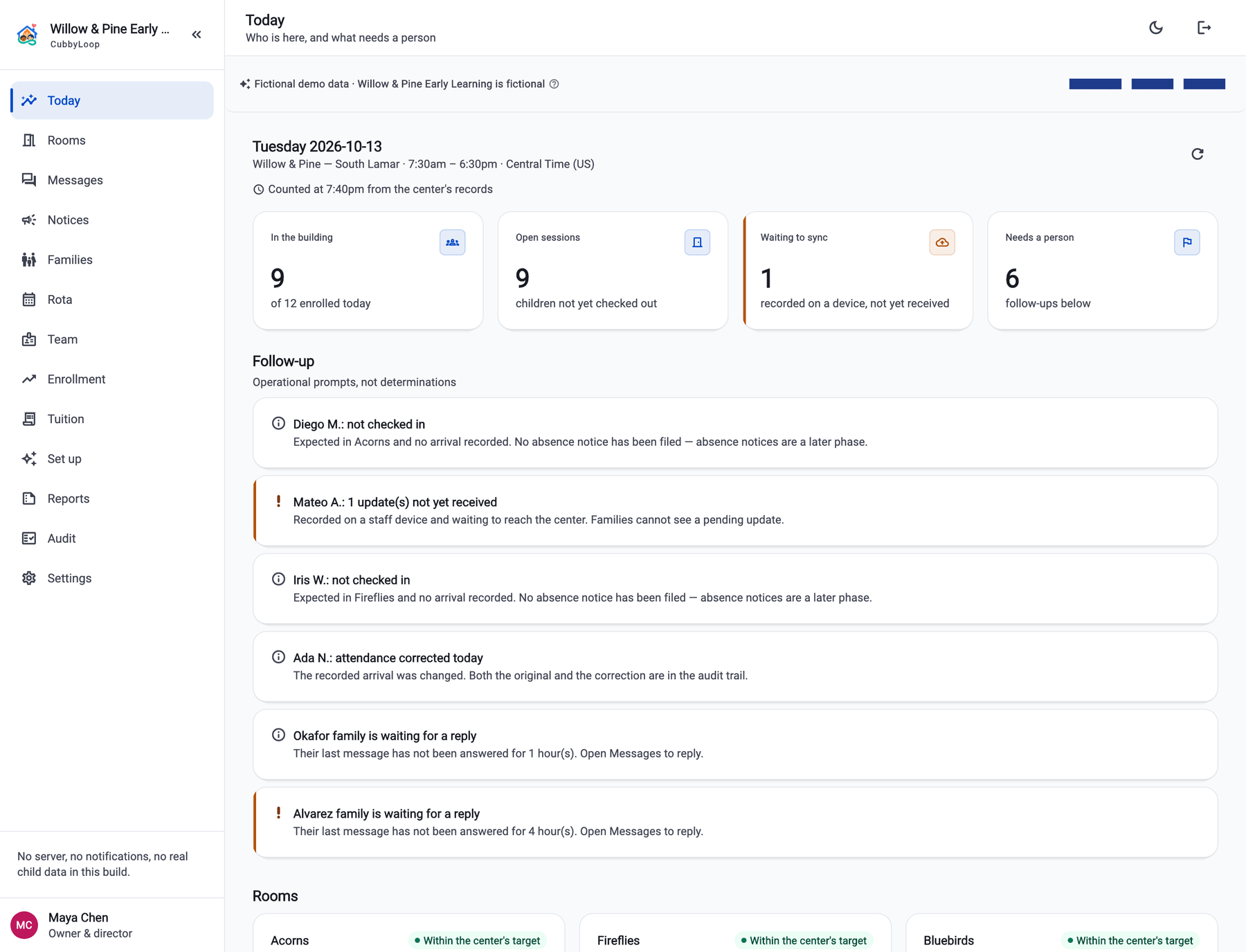
The CubbyLoop director dashboard for Willow & Pine Early Learning on Tuesday: nine of twelve children in the building, nine open sessions, one update waiting to sync and six follow-ups, a follow-up list naming children not yet checked in and two families waiting for a reply, and three classroom cards each within the center's staffing target.
The director's Today board. Swipe the screen sideways to read all of it. Real screen from the app, running the fictional Willow & Pine Early Learning demo. No part of it is a real child or a real center.
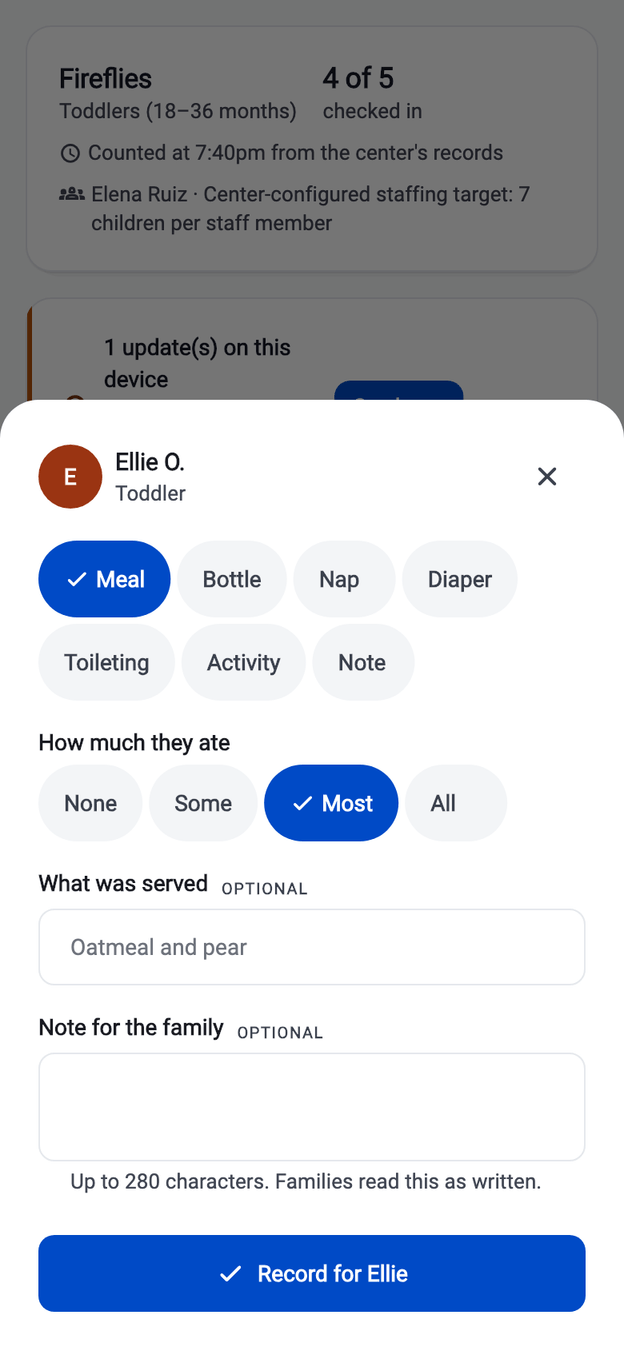
The CubbyLoop update composer on a phone: Ellie O. is selected, the Meal type is chosen, “Most” is selected for how much she ate, and a note field is ready for the family.
Recording a meal for one child, on a teacher's phone. Real screen from the app, running the fictional Willow & Pine Early Learning demo. No part of it is a real child or a real center.
  • One center, every room Directors, teachers and families on one record of the day.
  • Honest when offline A pending update says so. Nothing unsent is ever called saved.
  • No cameras. Ever. No video, no facial recognition, no location tracking of anyone.
  • The center's own data Nothing sold, nothing profiled, no advertising identifiers.
One platform

Six jobs a center does every day, in one place

Not six products bolted together and not a dashboard full of charts nobody reads — one record of the day that the director, the room and the family are all looking at.

Attendance

Check a child in from the room's board and out against the adult who collected them. Two taps on a bad connection never open two arrivals, and a mistake is corrected with a reason instead of being overwritten.

Classrooms

Every room has a board: who is in, who is not, and when it was last counted. Staffing shows against the target the center set for itself — CubbyLoop does not invent a legal threshold or judge you against one.

Staff

Roles, room assignments, a week's rota and an access trail. A teacher sees the rooms they are assigned to; remove the assignment and the access goes with it. A suspended account opens nothing.

Parent communication

Each family gets their own children's day as the room recorded it — arrivals, meals, naps, activities, the short note. Message threads and center notices live in the app too. Nothing is pushed to a phone yet.

Enrollment

Inquiry, waitlist, offer, registration, enrolled — with the registration a real step rather than a formality. Families, children and authorized pickups alongside it, and a roster import that previews before it writes.

Tuition

Tuition plans per child or per family, invoices with running balances, and a payment recorded by the staff member who saw the money arrive. Families cannot pay inside CubbyLoop — that is a later phase.

Three things are deliberately missing and we would rather say so here than let you find out: there are no photos or video, nothing is pushed to a phone — no alerts, no email, no texts — and families cannot pay tuition inside CubbyLoop. The full picture is on one page.

Owners and directors

The whole center on one board, counted from the records

Open CubbyLoop and the day is already counted: who is in the building, which sessions are still open, what was recorded on a phone and has not reached you yet, and the short list of things that need a person. Every number carries the minute it was counted, so a board that has gone quiet says so instead of pretending to be live.
  • In the building, open sessions, pending updates and follow-ups, at a glance
  • Follow-ups written as prompts for a person, never as determinations
  • Rooms measured against the center's own staffing target
  • An access trail of links, scope changes, corrections and checkouts, each with its reason
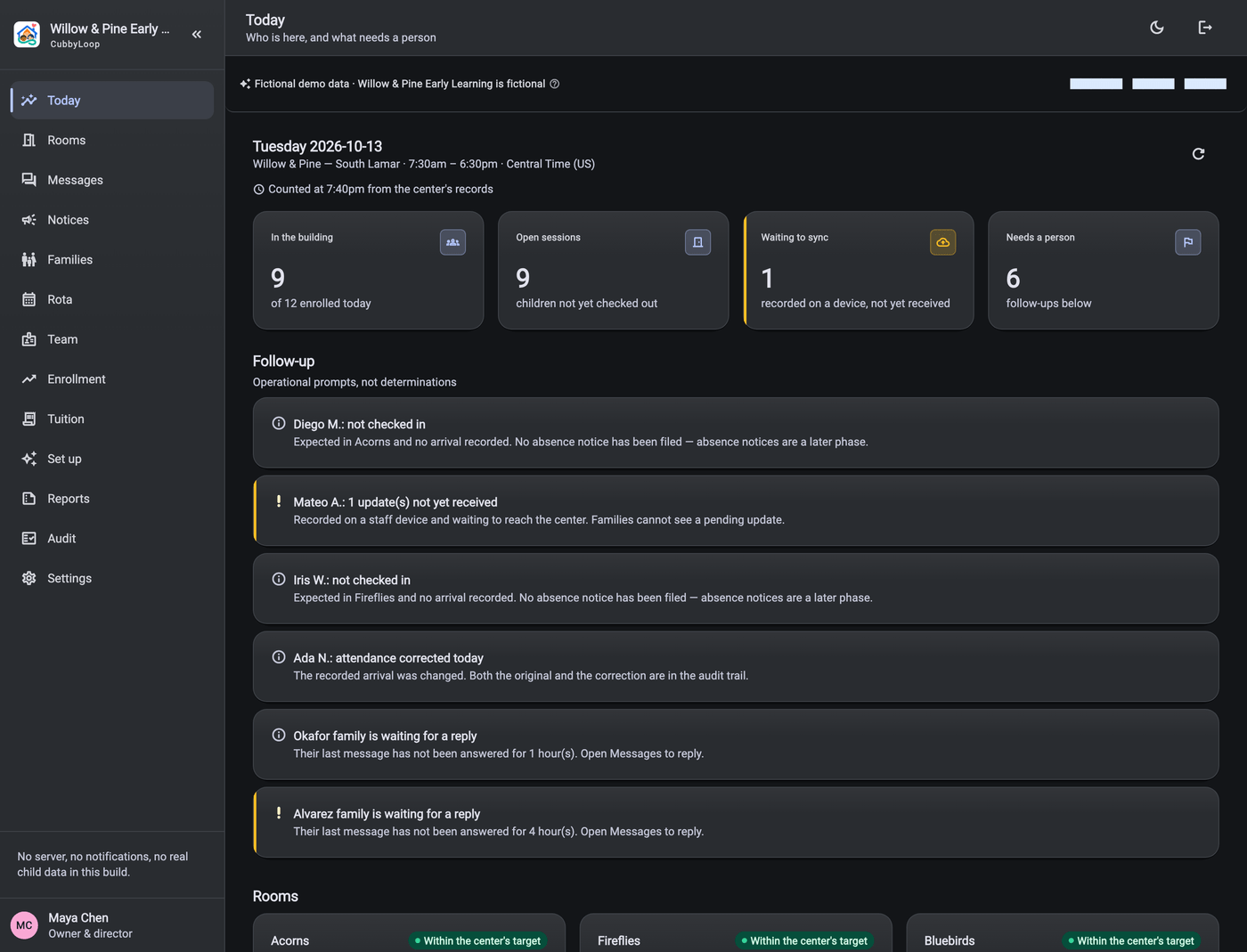
  • Light or dark, at whatever text size the reader has set
The same CubbyLoop director dashboard in dark mode: the counts for children in the building, open sessions, updates waiting to sync and follow-ups, the follow-up list and the three room cards, on a dark navy surface.
The same board at the end of a long day, in dark mode. Swipe the screen sideways to read all of it. Real screen from the app, running the fictional Willow & Pine Early Learning demo. No part of it is a real child or a real center.

Everything the director sees

Teachers

Record the day without leaving the room

A teacher logs a meal, a nap, a diaper change or an activity in a few taps. The composer asks only what that kind of update needs, so a meal cannot be saved as a shapeless note — and when the signal drops, the app says the update is sitting on the device instead of quietly losing it.
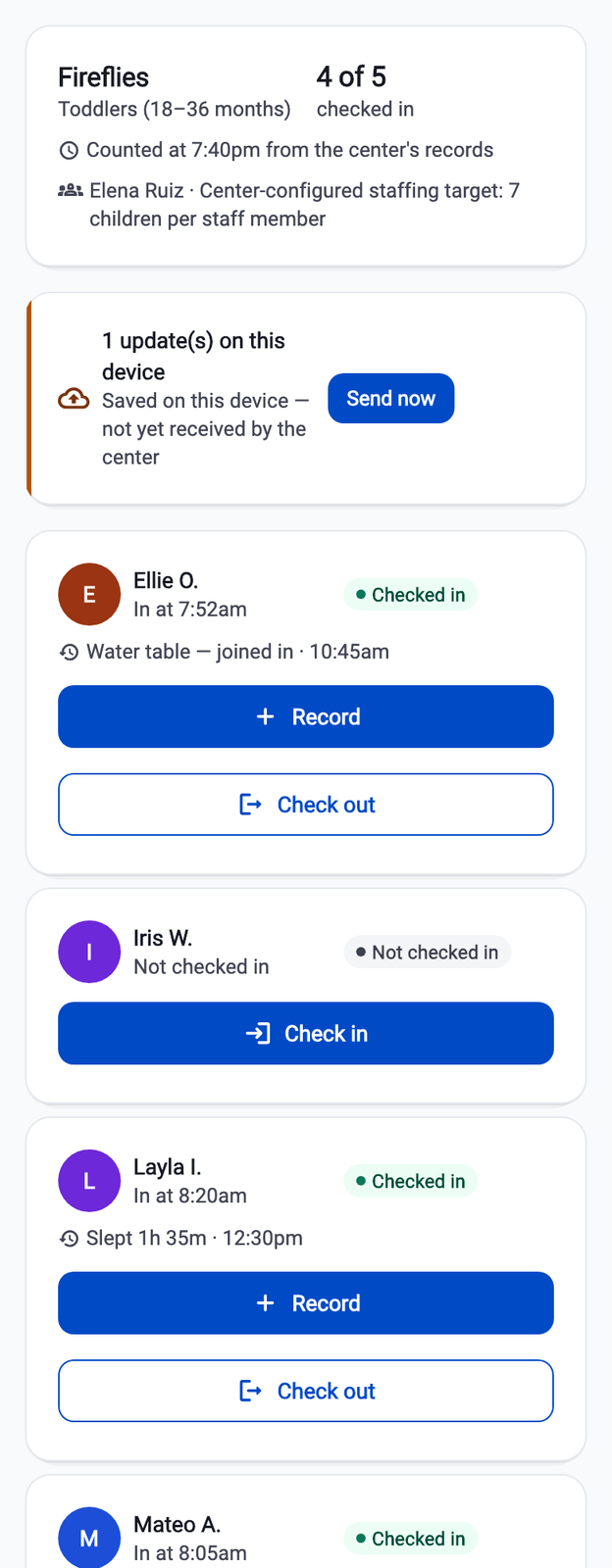
  • Check-in and check-out from the room's board, one tap each
  • Meals, bottles, naps, diapers, toileting, activities and notes
  • Big targets and a short path: pick the child, pick the type, done
  • A visible pending queue — “saved on this device, not yet received by the center”

Walk through a day

The CubbyLoop classroom board on a phone: the Fireflies room with four of five children checked in, a banner reading “1 update(s) on this device — saved on this device, not yet received by the center” with a Send now button, and per-child cards with Record and Check out buttons.
A room board, with one update still waiting to send. Real screen from the app, running the fictional Willow & Pine Early Learning demo. No part of it is a real child or a real center.
Parents and guardians

Their own child's day. Nobody else's child, ever.

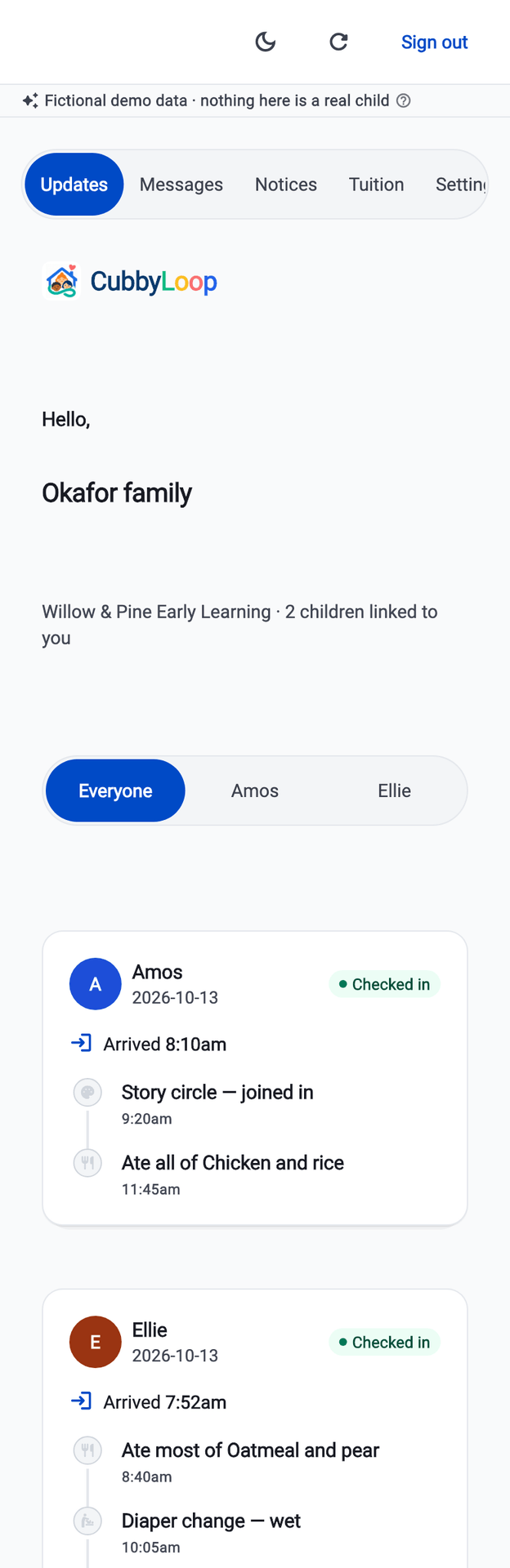
A parent opens the app and sees the children they are linked to, grouped by child and by day: arrival time, what was eaten, how long they slept, what they joined in, who collected them. A guardian linked to a different family cannot reach any of it — no classmate list, no other families, no staff directory.
  • Only the children a guardian is actually linked to
  • Arrival and pickup, with the authorized adult the child was released to
  • Each update exactly as the teacher wrote it
  • A link is created by accepting an invitation, never by editing a field

Who it's for

The CubbyLoop parent feed on a phone for the Okafor family: two linked children with filter chips for Everyone, Amos and Ellie, then Amos arrived 8:10am with story circle and lunch, and Ellie arrived 7:52am with a meal and a diaper change.
One family's feed. Two linked children, one day. Real screen from the app, running the fictional Willow & Pine Early Learning demo. No part of it is a real child or a real center.
The record

A day you can still explain a month later

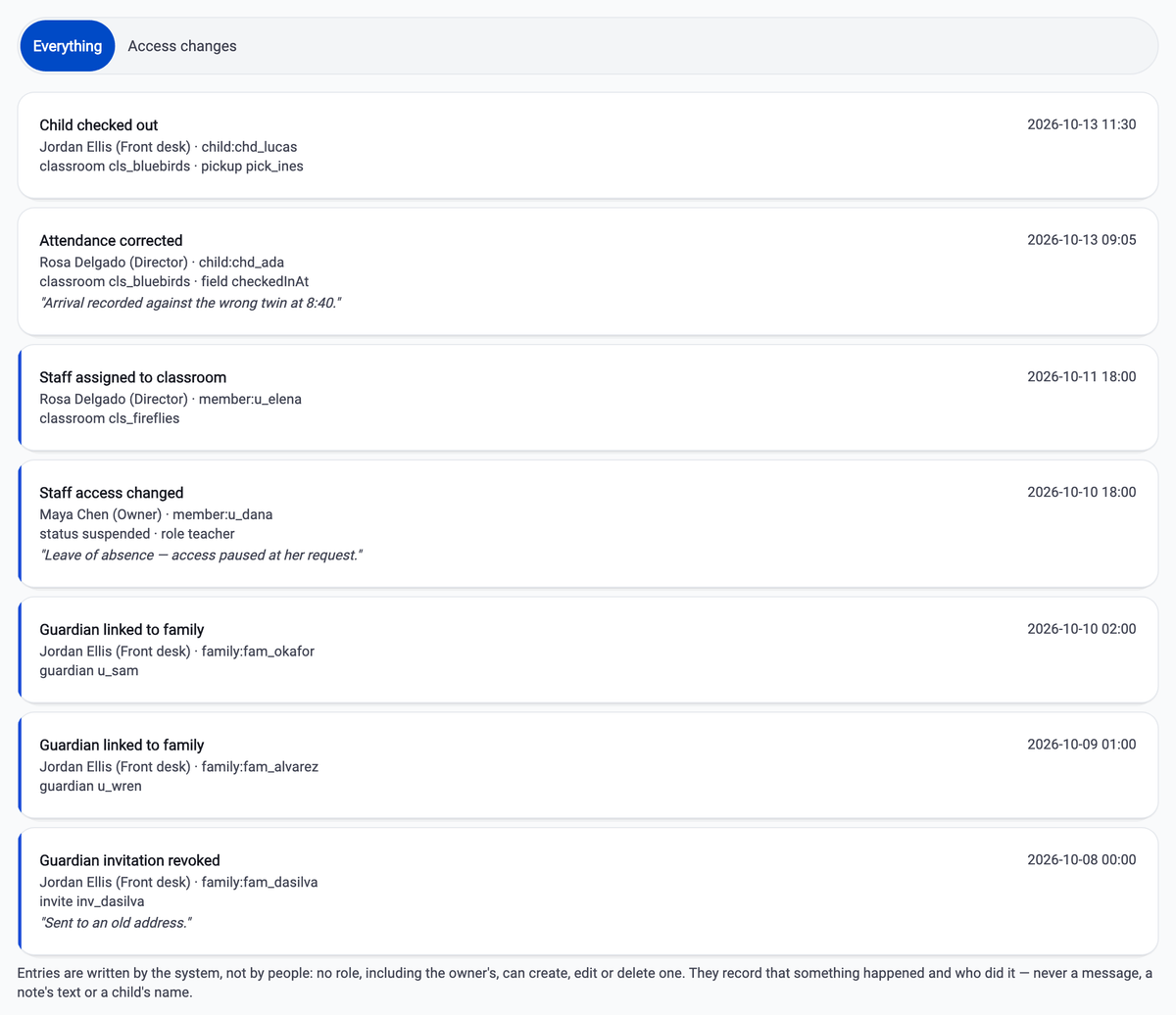
A correction keeps the original and says why it was made. Guardian links, access changes, attendance corrections and checkouts are all written down with the person and the reason — and without a child's name in the stored detail.
  • Corrections reference the original instead of replacing it
  • Checkout records the authorized adult the center released the child to
  • Service dates follow the center's own time zone, daylight saving included
  • “Recorded”, never “verified” — your staff did the identity check, not us
The CubbyLoop audit trail: a checkout naming the collecting adult, an attendance correction reading “Arrival recorded against the wrong twin at 8:40”, a staff classroom assignment, a suspension, two guardian links and a revoked invitation — each row with an actor, a role and a timestamp.
The access trail, a week later. Swipe the screen sideways to read all of it. Real screen from the app, running the fictional Willow & Pine Early Learning demo. No part of it is a real child or a real center.
The boundary

What CubbyLoop has no field for

The strongest protection is not a policy page — it is the absence of a place to put something. These are not switches a center can turn on. There is nowhere in CubbyLoop to record any of them.

Read the privacy boundaries

  • Health history, diagnoses, medication or immunization documents
  • Government identifiers, custody documents or court orders
  • Child accounts, child-facing chat or public child profiles
  • Cameras, video streaming, facial recognition or biometric check-in
  • Precise location tracking of children, staff or guardians
  • Advertising identifiers, behavioural profiling or data sold to anyone
Pricing

Two plans. Both printed here in full.

No per-child pricing, no feature tiers, no “contact us for a quote”. Which plan you need is decided by the size of the center, and both numbers are on this page.

Single center

$89 per month

or $890 a year — two months free

One center. The daily loop for every room in it, and every family attached to it.


  • Up to 60 enrolled children
  • Up to 6 rooms
  • Up to 15 staff accounts
  • Up to 150 linked guardians

Multi-center

$179 per month

or $1,790 a year — two months free

Two or more centers under one operator, each with its own rooms, staff and families.


  • Up to 250 enrolled children
  • Up to 25 rooms
  • Up to 60 staff accounts
  • Up to 600 linked guardians

30 days free, and the trial is the whole product rather than a trimmed version of it. US dollars, tax excluded. Every feature is in both plans — the access trail and guardian privacy are not upsells. The multi-center plan is a published price ahead of a working feature: CubbyLoop runs one center at one location today.

The full pricing page
Getting started

How a center comes on board

CubbyLoop is opening with a small number of centers at a time, so the people building it can sit with the people using it.

  1. Tell us about your center

    How many children, how many rooms, what you use today and the part of the day that reliably goes wrong. A person reads it and replies — there is no sequence, no sales team and no call required to find out the price.

  2. We walk you through it on your center's shape

    One classroom, one family, one child, one invited parent — the same loop you would run on a Tuesday morning, not a slide deck. Nothing has to be imported first, and a roster import is there for when you want it.

  3. 30 days free when sign-up opens

    Centers that have written in go first. The trial is the whole product rather than a trimmed version of it, nothing is charged while it runs, and the price is published on this site instead of quoted on a call.

There is no “create account” button on this site yet, on purpose. Signing up has to work on the first morning a center relies on it, and the last pieces — the sign-up screen itself and password reset — are not finished. Rather than collect a card for a promise, we take centers on one at a time and say exactly where the product is: here it is, in full.

Tell us about your center

Tell us about your center

CubbyLoop is being built for independent centers of roughly 20 to 100 children at one location. If that is you, we would rather hear what your day actually looks like than guess at it.

Writing to us starts an email to support@cubbyloop.com. There is no form on this site and nothing is collected by this page.