
Five minutes, one fictional day
The demo is the product with a fictional center inside it. It opens on a director's morning, runs a child through arrival, a meal, a nap and pickup, and stops at the point where a parent can see exactly what the room recorded — and a second family can see none of it.
Willow & Pine Early Learning does not exist
Every center, family, child, room, address, phone number and email address in the demo was invented for it. No real child's information has ever been in CubbyLoop, and every authenticated screen in the app carries a standing “Fictional demo data” marker so nobody is ever a tap away from mistaking it for a roster.
The staff accounts use .example addresses, which cannot
receive mail anywhere on the internet. That is deliberate.
- Center
- Willow & Pine Early Learning (fictional)
- Where
- Austin, Texas — one location
- Rooms
- Fireflies, Bluebirds and Acorns
- Children
- 12 fictional children across several families
- Staff
- Owner, director, front desk and teachers, all on .example addresses
- Guardians
- Two, linked to different families, so isolation can be checked
Nine steps, in this order
It is written down because a demo that wanders proves nothing. Each step exists to settle one question, and the question is written underneath it.
-
Start on the director's Today screen
Children in the building, open attendance sessions, updates still sitting on a staff device, and the handful of things that need a person. Every count carries the moment it was counted.
What it settles The board is computed from the records, not from a number someone kept in their head.
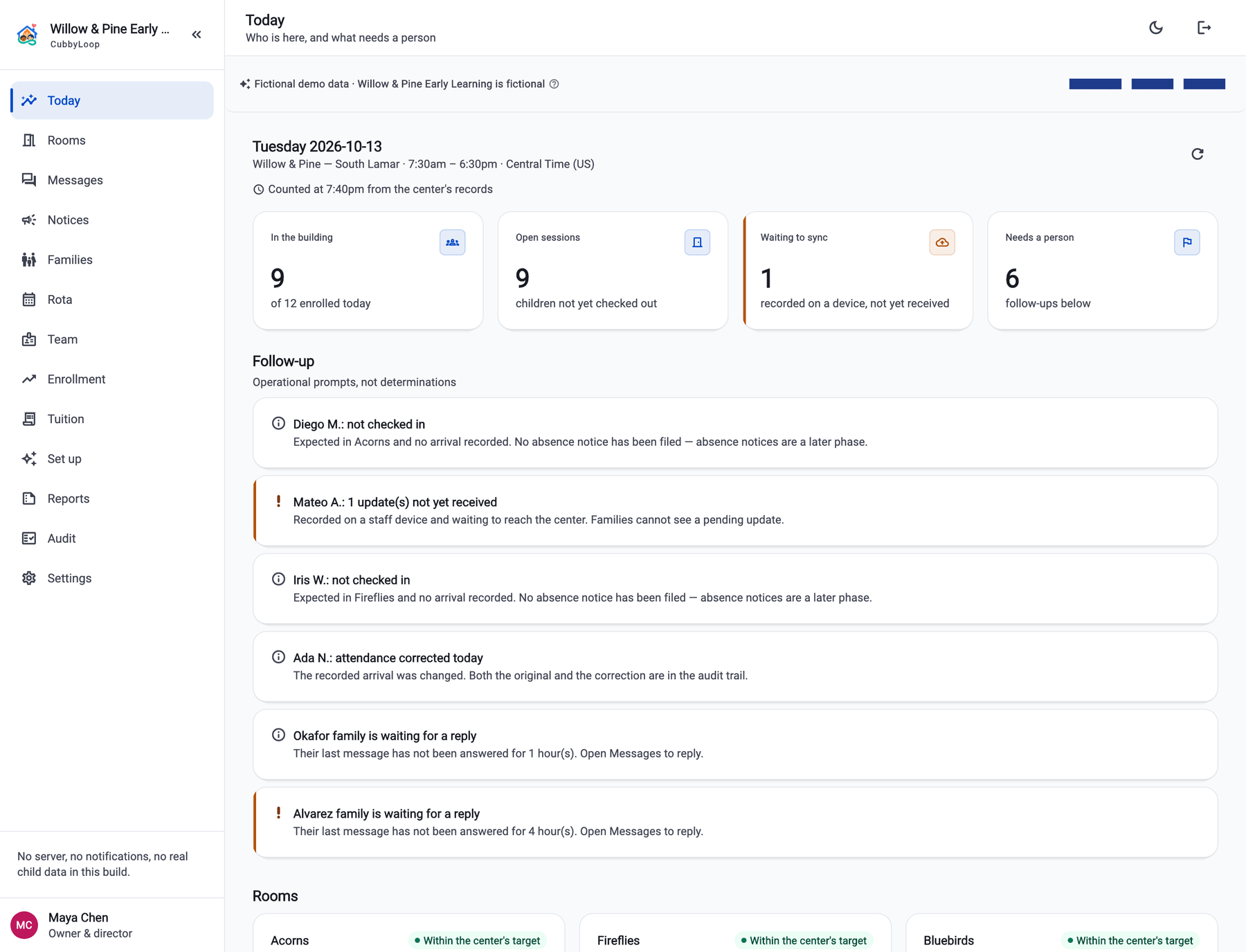
Step one. The director's Today board. Swipe the screen sideways to read all of it. Real screen from the app, running the fictional Willow & Pine Early Learning demo. No part of it is a real child or a real center. -
Open the Fireflies room and check a child in
One tap from the room's board. The room count and the center's count both move, and the arrival appears in the audit trail with the staff member's name against it.
What it settles Arrival is one action, and it is attributable afterwards.
-
Switch to the assigned teacher
Sign in as Elena Ruiz, who is assigned to Fireflies. Bluebirds and Acorns are simply not there — not greyed out, not behind a prompt. Not there.
What it settles Classroom scope is a boundary, not a hidden button.
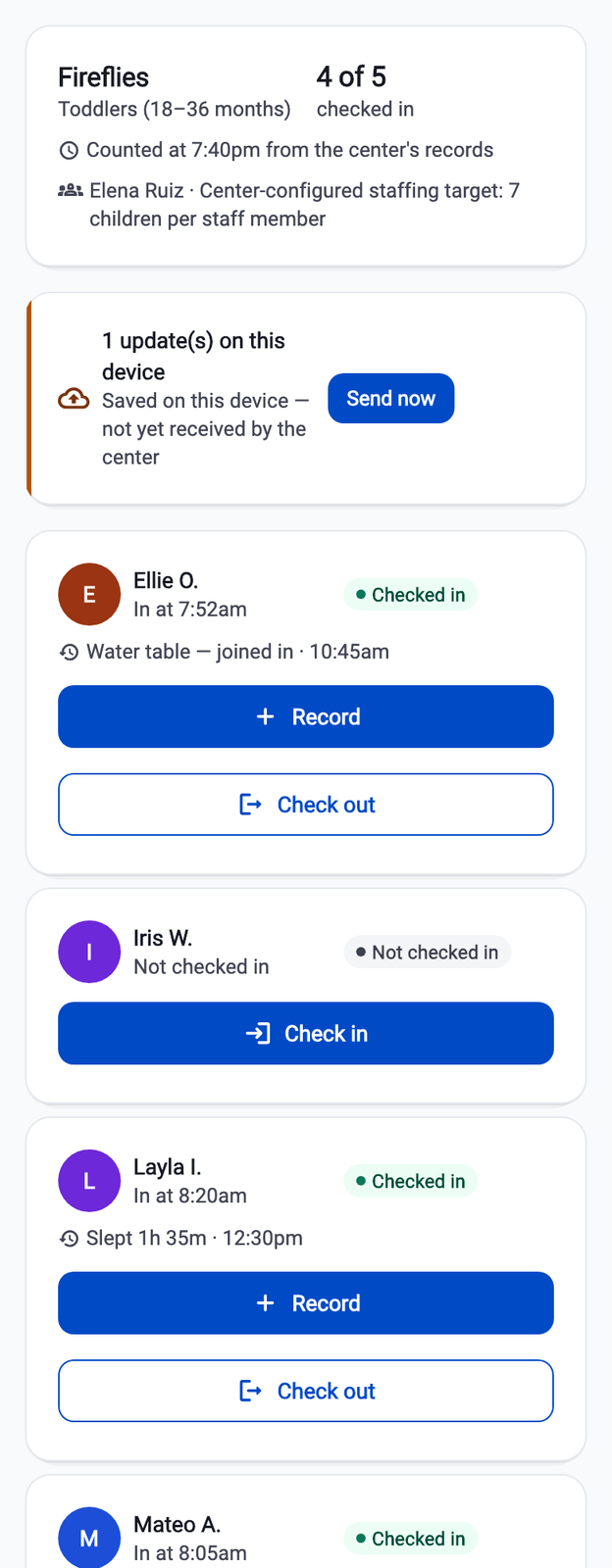
Step three. The teacher sees Fireflies, and only Fireflies. Real screen from the app, running the fictional Willow & Pine Early Learning demo. No part of it is a real child or a real center. -
Record a meal and a nap, then watch them settle
The composer asks only what that type of update needs. Turn the connection off first and the update is labelled “saved on this device — not yet received by the center”, and counted as waiting on the director's board.
What it settles Nothing pending is ever called saved, and the family does not see it until it arrives.
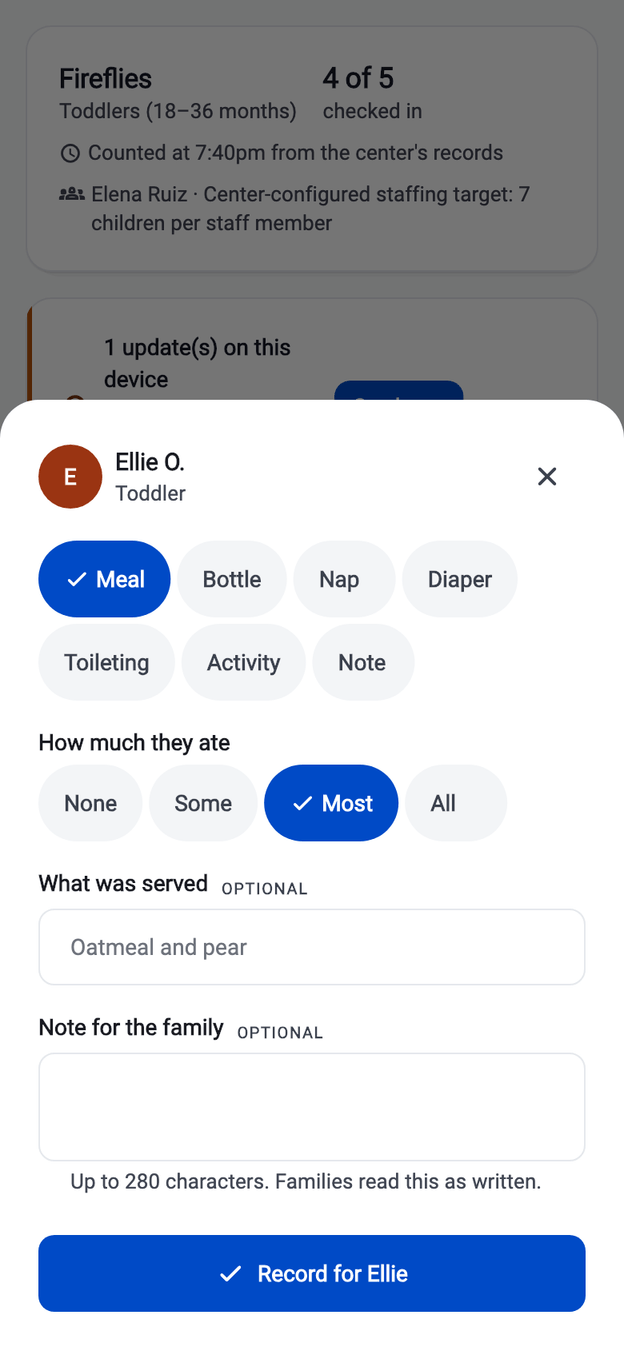
Step four. One meal, for one child, in a few taps. Real screen from the app, running the fictional Willow & Pine Early Learning demo. No part of it is a real child or a real center. -
Switch to that child's guardian
The parent view opens on the family's own feed: their linked children, grouped by child and by service date, with arrival times and the day's updates as the teacher wrote them.
What it settles The loop closes — what the room recorded is what the family reads.
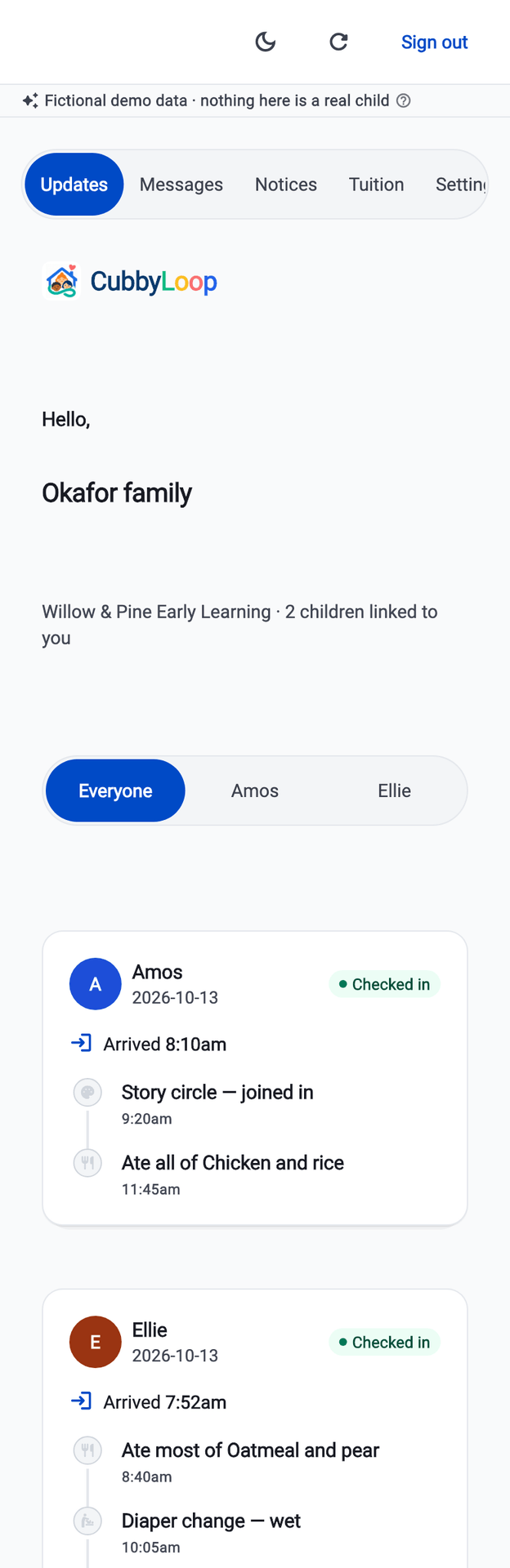
Step five. The Okafor family's feed — two linked children, one day. Real screen from the app, running the fictional Willow & Pine Early Learning demo. No part of it is a real child or a real center. -
Now sign in as a guardian of a different family
The second family sees their own one child and nothing else. No classmate list, no other guardians, no roster, no staff directory. The first family's day is not reachable from here at all.
What it settles Family isolation, which is the single most important property in the product.
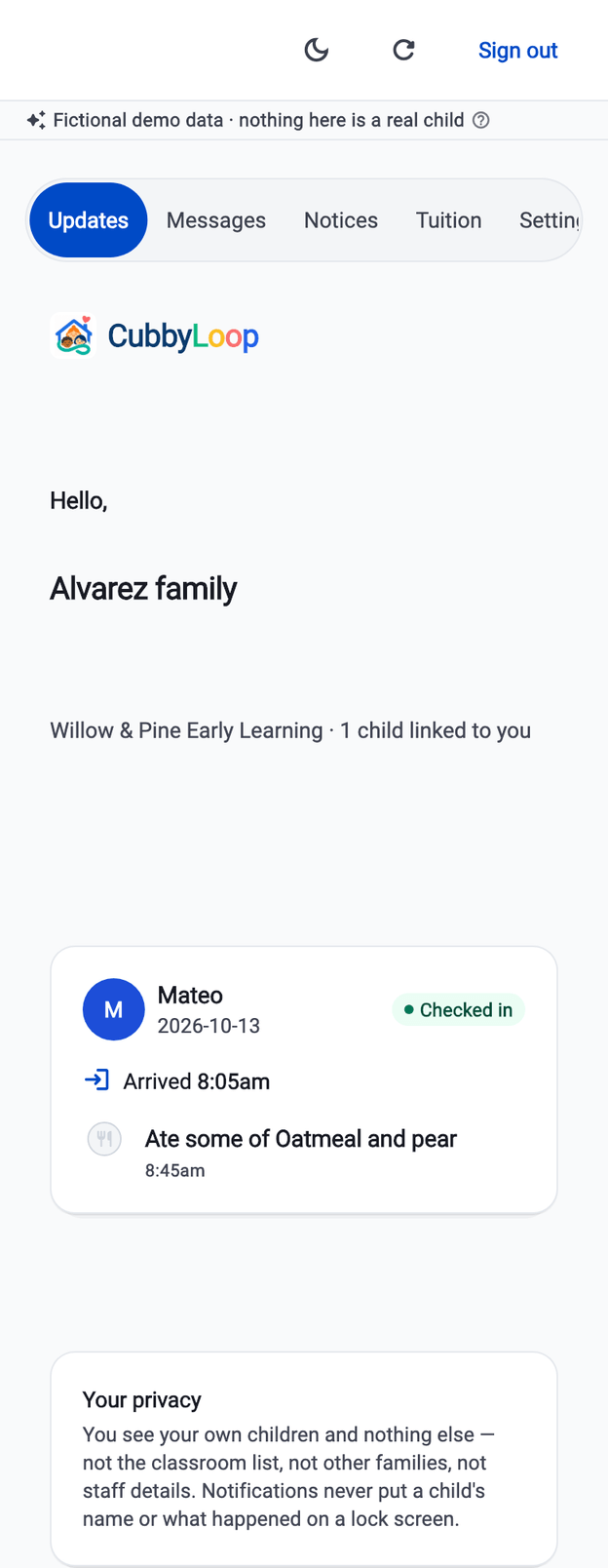
Step six. A different guardian. One child, and no sign of the first family. Real screen from the app, running the fictional Willow & Pine Early Learning demo. No part of it is a real child or a real center. -
Return to staff and check the child out
Checkout records which authorized adult collected the child. The screen says that CubbyLoop recorded the release — it does not say the pickup was verified.
What it settles The product describes what it actually knows.
-
Open the audit event
The checkout is there with the actor, the role, the classroom and the pickup reference. An attendance correction sits a few rows above it, with its reason and the original still intact.
What it settles The day can be read back honestly a month later — and CubbyLoop did not replace the center's physical identity check.
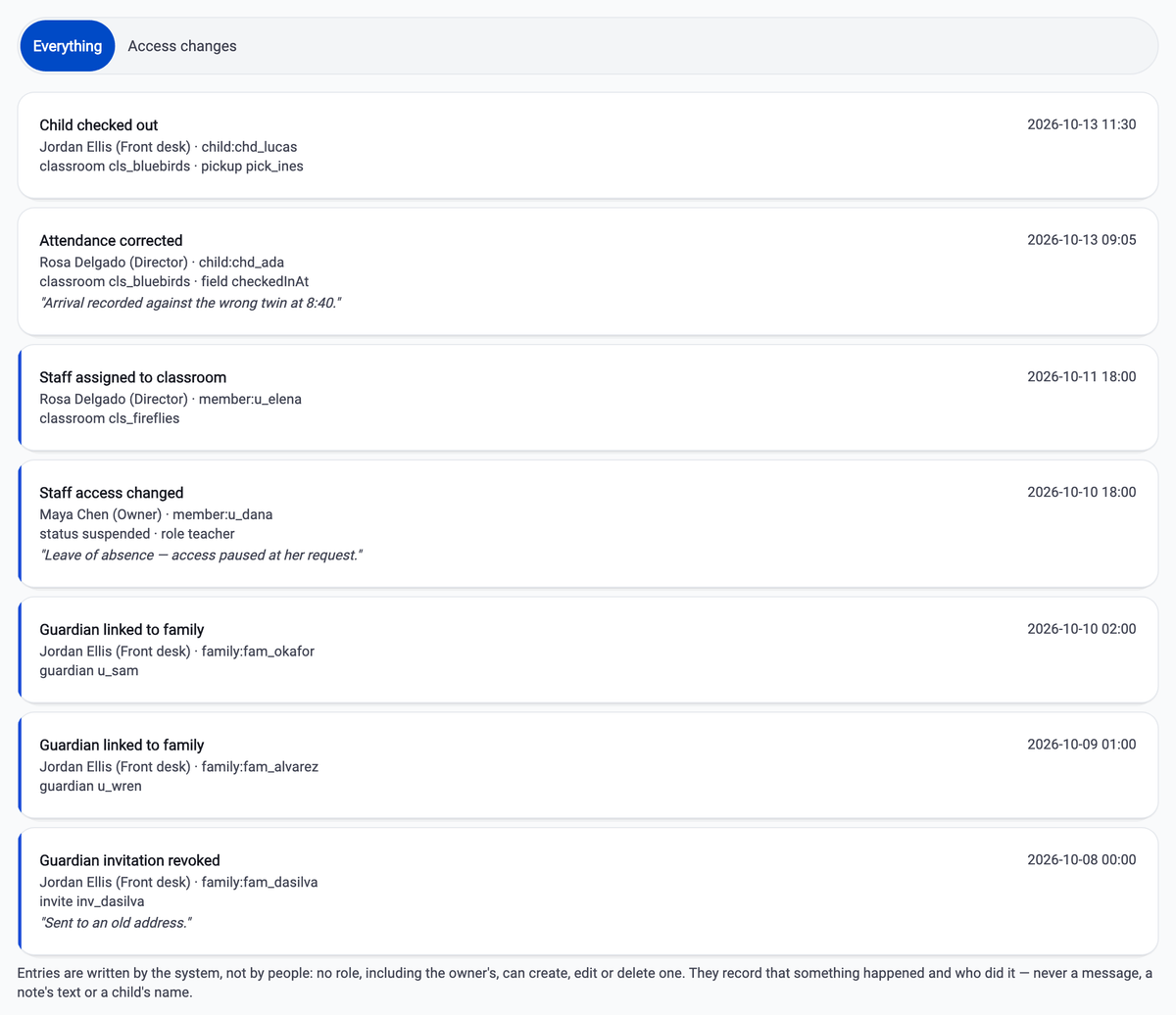
Step eight. The same actions, read back a week later. Swipe the screen sideways to read all of it. Real screen from the app, running the fictional Willow & Pine Early Learning demo. No part of it is a real child or a real center. -
Reset the demo
One control puts the fictional center back exactly as it started, so the next person walks the same script.
What it settles Nothing you do in the demo persists, and nothing in it was ever real.
The awkward situations are seeded on purpose
A demo built only from a tidy morning tells you nothing about the afternoon. The fictional center is seeded with the states a real center actually hits, and the walkthrough can stop on any of them.
- A child expected today who has not arrived
- An attendance session still open late in the day
- A checkout that was corrected, with the original kept
- A suspended teacher whose access authorizes nothing
- A guardian invitation that was revoked before it was used
- An update captured offline and still waiting to be received
What the demo cannot do
These are not settings that are switched off for the demo. The demo build has no path to any of them — it runs entirely on the device it is installed on, and it is checked at build time that a release build cannot be pointed at a demo or emulator backend either.
- Send a real message, email, text or notification to anyone
- Upload anything to production storage
- Create a payment session or charge a card
- Reach any backend that is not on the device itself
- Produce a share link that works outside the demo
- Mix with a signed-in real center — there are no real centers
Reset, and it is exactly as it was
One control returns the fictional center to its starting state, so the next walkthrough begins the same way. Nothing you do in the demo survives it, and nothing in it was ever real.
The walkthrough is built to work at phone and desktop widths and to finish inside five minutes. If it takes longer than that, the problem is the product, not the person doing the demo.
Want it walked through with your rooms in mind?
Tell us how your day runs and we will walk the Willow & Pine Early Learning script against it, stopping wherever it stops matching your center. That is more useful to us than a polished pitch.
Writing to us starts an email to support@cubbyloop.com. There is no form on this site and nothing is collected by this page.